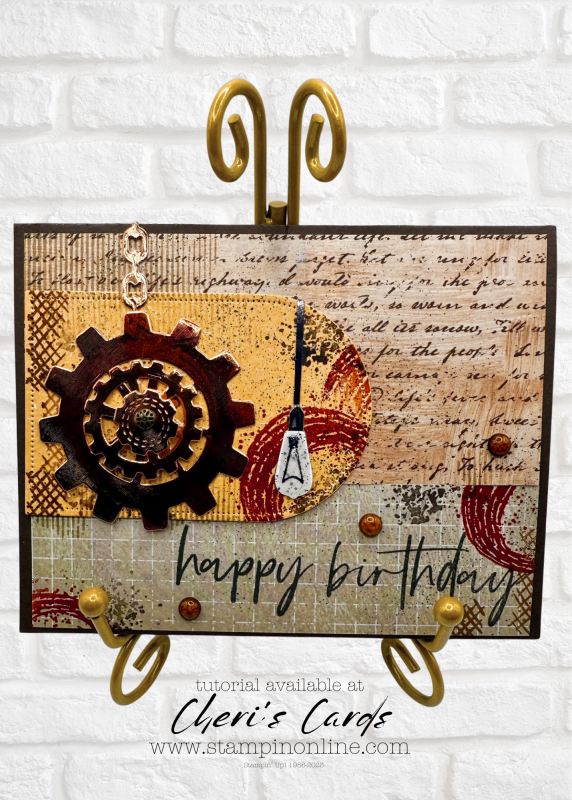
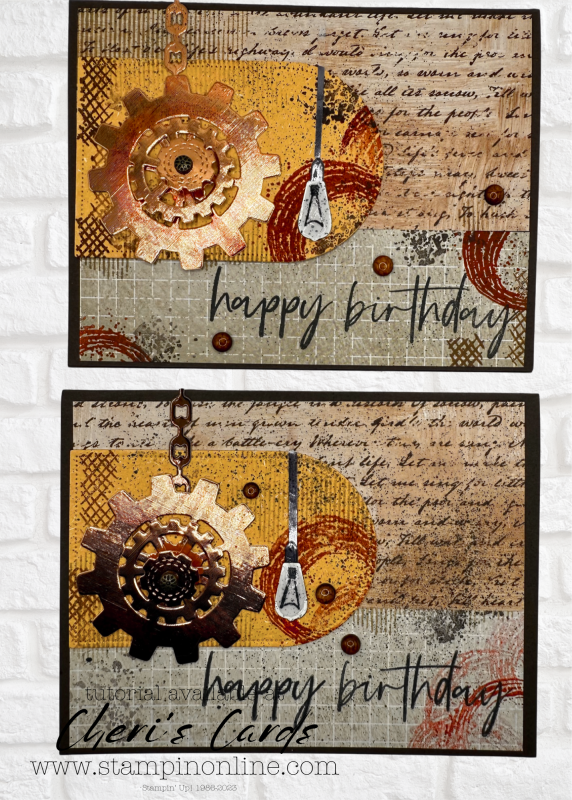
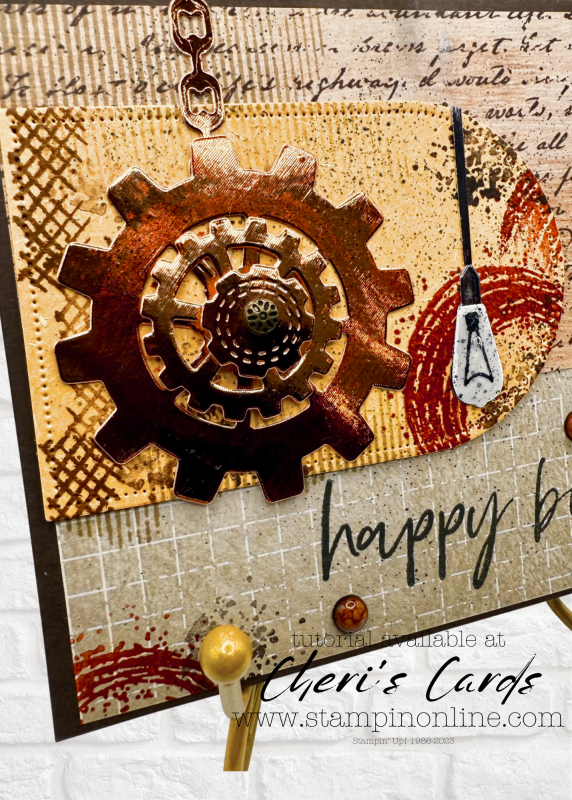
Today I have a great grungy masculine birthday card – that SPINS!!
The card features Gears and Textures – which is perfectly named. The stamps have so many options for creating background textures on any card – with the gears or not. The dies are gears, chains, lights and more.
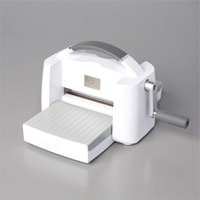
So much fun to play with. I added spinning dots under the top layer to give the card movement. You can find those here:
I paired the bundle with the Nature Walk paper – as I did a couple of weeks ago (look through the past posts as that card is green!) I love that the paper is so versatile. It starts with it’s own bit of texture and then I layered the texture stamps over the top for even more.
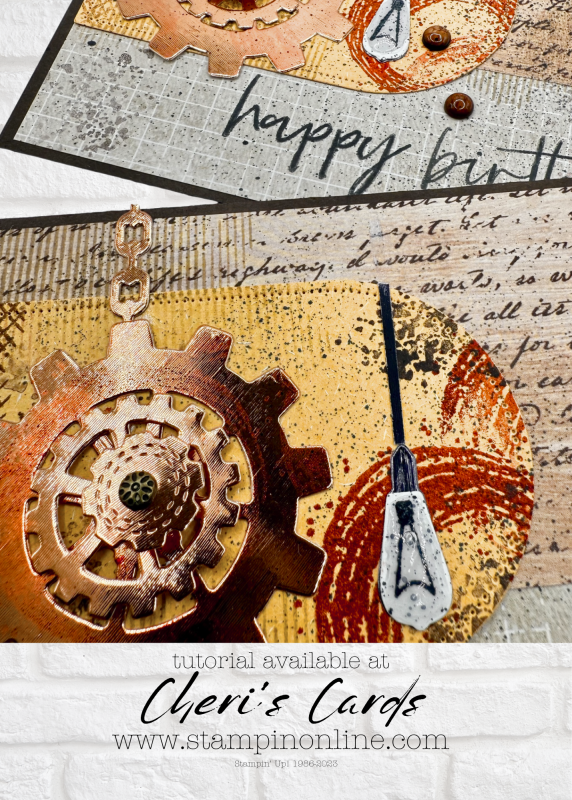
The arch is cut from the Natural Hues cardstock – which has a texture of it’s own. The gears are cut from the Textured Metallic…can you see the theme here?
I made my gear a bit rusty by stamping over it with a cajun inked texture stamp.
The light bulb is given some glass courtesy of Fine Tip glue!
For the final touch I spritzed the card with Black Blends. It is the one thing that pulled all the layers together.
Add this bundle to your cart today – you won’t be disappointed!
Loyalty Thank You Gifts with online orders
You can see the standard levels
You earn ALL of the rewards to the level of order you place (amount calculated on merchandise – rewards, shipping, tax not included)
Get the January Tutorial bundle when you spend $50+
Get $5 bonus bucks for every $50 you spend
A new product of the month now available!
This past December new features on email programs went in to effect to help keep spam from your inbox. Unfortunately that means legit emails often are not delivered.
If you are on my email list and have not gotten an email recently (I sent 3 the week of January 6), then take these steps to add my email to your contacts. If you don’t see any emails from me in the last few weeks, then you can sign up again (link in the comments).
For now, it helps if you are on my list to take these steps:
A couple quick things to make sure my emails remain in your inbox
1. Reply “OK” to any recent email sent from my cheri@stampinonline email.
It helps tell your inbox that I’m a trusted sender.
2. Move me to your Primary inbox or add me to contacts.
So future issues don’t land in Spam or Promotions.
Find a recent email and do the following:
Gmail (Mobile):
Tap the 3 dots in the top-right corner → Move to > Primary
Gmail (Desktop):
Drag this email into the Primary tab (top left of your inbox)
Apple Mail (iPhone, iPad, Mac):
Tap or click my email address at the top → Add to Contacts
Outlook, Yahoo, or others:
Add cheri@stampinonline.com to your contacts or safe sender list
If you have not gotten an email from me in the last few weeks:
*Check your spam or junk folder – Move it back to your inbox and click “Not Spam” or “Report as not junk”
*Gmail users check your promotions tab, if you find it there, drag it to your primary tab. If Gmail asks apply to future messages, click yes.

![Gears & Textures Bundle (English) [ 166854 ]](https://assets1.tamsnetwork.com/images/EC042017NF/166854s.jpg "Gears & Textures Bundle (English) [ 166854 ]")
![Natural Hues 12" X 12" (30.5 X 30.5 Cm) Textured Specialty Paper [ 166929 ]](https://assets1.tamsnetwork.com/images/EC042017NF/166929s.jpg "Natural Hues 12\" X 12\" (30.5 X 30.5 Cm) Textured Specialty Paper [ 166929 ]")
![Nature Walk 12" X 12" (30.5 X 30.5 Cm) Designer Series Paper [ 166912 ]](https://assets1.tamsnetwork.com/images/EC042017NF/166912s.jpg "Nature Walk 12\" X 12\" (30.5 X 30.5 Cm) Designer Series Paper [ 166912 ]")
![Everyday Arches Dies [ 164629 ]](https://assets1.tamsnetwork.com/images/EC042017NF/164629s.jpg "Everyday Arches Dies [ 164629 ]")
![Textured Metallic 12" X 12" (30.5 X 30.5 Cm) Specialty Paper [ 163772 ]](https://assets1.tamsnetwork.com/images/EC042017NF/163772s.jpg "Textured Metallic 12\" X 12\" (30.5 X 30.5 Cm) Specialty Paper [ 163772 ]")
![Pressed Flower Motifs [ 165215 ]](https://assets1.tamsnetwork.com/images/EC042017NF/165215s.jpg "Pressed Flower Motifs [ 165215 ]")
![Streaked Dots [ 165902 ]](https://assets1.tamsnetwork.com/images/EC042017NF/165902s.jpg "Streaked Dots [ 165902 ]")
![Cajun Craze Classic Stampin' Pad [ 147085 ]](https://assets1.tamsnetwork.com/images/EC042017NF/147085s.jpg "Cajun Craze Classic Stampin' Pad [ 147085 ]")
![Early Espresso Classic Stampin' Pad [ 147114 ]](https://assets1.tamsnetwork.com/images/EC042017NF/147114s.jpg "Early Espresso Classic Stampin' Pad [ 147114 ]")
![Pecan Pie Classic Stampin' Pad [ 161665 ]](https://assets1.tamsnetwork.com/images/EC042017NF/161665s.jpg "Pecan Pie Classic Stampin' Pad [ 161665 ]")
![Tuxedo Black Memento Ink Pad [ 132708 ]](https://assets1.tamsnetwork.com/images/EC042017NF/132708s.jpg "Tuxedo Black Memento Ink Pad [ 132708 ]")
![Basic Black Stampin' Blends Combo Pack [ 154843 ]](https://assets1.tamsnetwork.com/images/EC042017NF/154843s.jpg "Basic Black Stampin' Blends Combo Pack [ 154843 ]")
![Early Espresso 8-1/2" X 11" Cardstock [ 119686 ]](https://assets1.tamsnetwork.com/images/EC042017NF/119686s.jpg "Early Espresso 8-1/2\" X 11\" Cardstock [ 119686 ]")
![Fine-Tip Glue Pen [ 138309 ]](https://assets1.tamsnetwork.com/images/EC042017NF/138309s.jpg "Fine-Tip Glue Pen [ 138309 ]")
![Mini Glue Dots [ 103683 ]](https://assets1.tamsnetwork.com/images/EC042017NF/103683s.jpg "Mini Glue Dots [ 103683 ]")