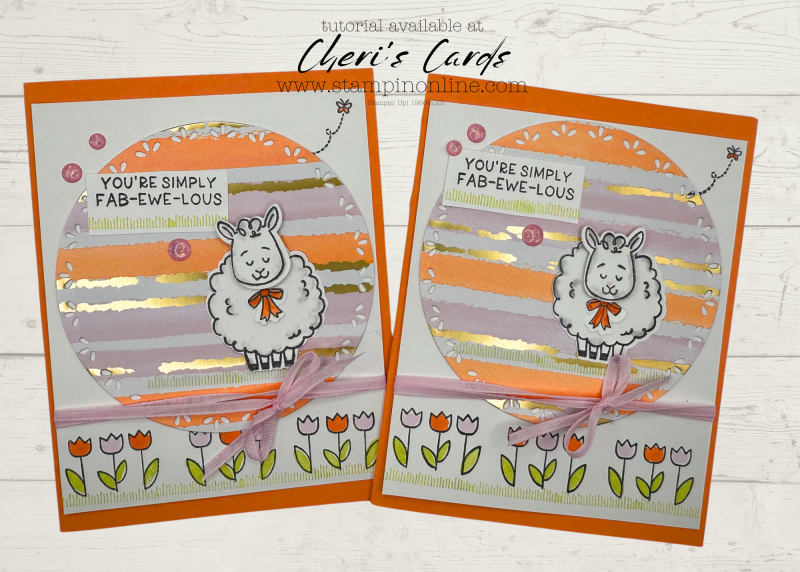
Today I have a sweet spring card, I spent nearly all week working on my Try It Class – mailed out, filming, editing, uploading….all that’s left now is the final pages of the PDF. When I was done with that class’s last project most of what you will see on today’s card was on the table. I took remnants from our 9th project and turned them in today’s adorable sheep card!
The Splash of Sparkle paper is really special – check it out in the tutorial and make sure to visit my FB page or Youtube channel later today for my unboxing video. I will be impatiently waiting for my UPS driver : )
Doesn’t this little girl bring a smile to your face? So easy to make with the two step stamping and simple punch.
Stay safe if you are in the eye of the storm and remember being stranded inside makes for PERFECT crafting weather!
Loyalty Thank You Gifts with online orders
You can see the standard levels
You earn ALL of the rewards to the level of order you place (amount calculated on merchandise – rewards, shipping, tax not included)
Get the January Tutorial bundle when you spend $50+
Get $5 bonus bucks for every $50 you spend
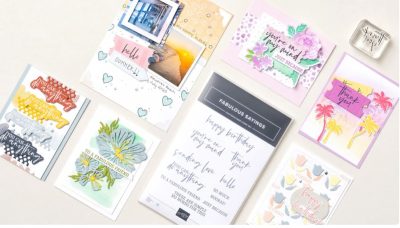
A new product of the month now available!
This past December new features on email programs went in to effect to help keep spam from your inbox. Unfortunately that means legit emails often are not delivered.
If you are on my email list and have not gotten an email recently (I sent 3 the week of January 6), then take these steps to add my email to your contacts. If you don’t see any emails from me in the last few weeks, then you can sign up again (link in the comments).
For now, it helps if you are on my list to take these steps:
A couple quick things to make sure my emails remain in your inbox
1. Reply “OK” to any recent email sent from my cheri@stampinonline email.
It helps tell your inbox that I’m a trusted sender.
2. Move me to your Primary inbox or add me to contacts.
So future issues don’t land in Spam or Promotions.
Find a recent email and do the following:
Gmail (Mobile):
Tap the 3 dots in the top-right corner → Move to > Primary
Gmail (Desktop):
Drag this email into the Primary tab (top left of your inbox)
Apple Mail (iPhone, iPad, Mac):
Tap or click my email address at the top → Add to Contacts
Outlook, Yahoo, or others:
Add cheri@stampinonline.com to your contacts or safe sender list
If you have not gotten an email from me in the last few weeks:
*Check your spam or junk folder – Move it back to your inbox and click “Not Spam” or “Report as not junk”
*Gmail users check your promotions tab, if you find it there, drag it to your primary tab. If Gmail asks apply to future messages, click yes.

![Woolly Friends Bundle (English) [ 166888 ]](https://assets1.tamsnetwork.com/images/EC042017NF/166888s.jpg "Woolly Friends Bundle (English) [ 166888 ]")
![Splash Of Sparkles 12" X 12" (30.5 X 30.5 Cm) Specialty Designer Series Paper [ 167200 ]](https://assets1.tamsnetwork.com/images/EC042017NF/167200s.jpg "Splash Of Sparkles 12\" X 12\" (30.5 X 30.5 Cm) Specialty Designer Series Paper [ 167200 ]")
![Sparkle Dot Essentials [ 166991 ]](https://assets1.tamsnetwork.com/images/EC042017NF/166991s.jpg "Sparkle Dot Essentials [ 166991 ]")
![Bubble Bath 1/8" (3.2 Mm) Faux Linen Ribbon [ 167075 ]](https://assets1.tamsnetwork.com/images/EC042017NF/167075s.jpg "Bubble Bath 1/8\" (3.2 Mm) Faux Linen Ribbon [ 167075 ]")
![Spotlight On Nature Dies [ 163580 ]](https://assets1.tamsnetwork.com/images/EC042017NF/163580s.jpg "Spotlight On Nature Dies [ 163580 ]")
![Timid Tiger 8 1/2" X 11" Cardstock [ 165626 ]](https://assets1.tamsnetwork.com/images/EC042017NF/165626s.jpg "Timid Tiger 8 1/2\" X 11\" Cardstock [ 165626 ]")
![Timid Tiger Stampin’ Blends Combo Pack [ 165291 ]](https://assets1.tamsnetwork.com/images/EC042017NF/165291s.jpg "Timid Tiger Stampin’ Blends Combo Pack [ 165291 ]")
![Bubble Bath Stampin’ Blends Combo Pack [ 161675 ]](https://assets1.tamsnetwork.com/images/EC042017NF/161675s.jpg "Bubble Bath Stampin’ Blends Combo Pack [ 161675 ]")
![Tuxedo Black Memento Ink Pad [ 132708 ]](https://assets1.tamsnetwork.com/images/EC042017NF/132708s.jpg "Tuxedo Black Memento Ink Pad [ 132708 ]")
![Lemon Lime Twist Classic Stampin' Pad [ 147145 ]](https://assets1.tamsnetwork.com/images/EC042017NF/147145s.jpg "Lemon Lime Twist Classic Stampin' Pad [ 147145 ]")
![Stampin' Blends Color Lifter [ 144608 ]](https://assets1.tamsnetwork.com/images/EC042017NF/144608s.jpg "Stampin' Blends Color Lifter [ 144608 ]")
![Smoky Slate Stampin' Blends Combo Pack [ 154904 ]](https://assets1.tamsnetwork.com/images/EC042017NF/154904s.jpg "Smoky Slate Stampin' Blends Combo Pack [ 154904 ]")